
How Call Me Ready works
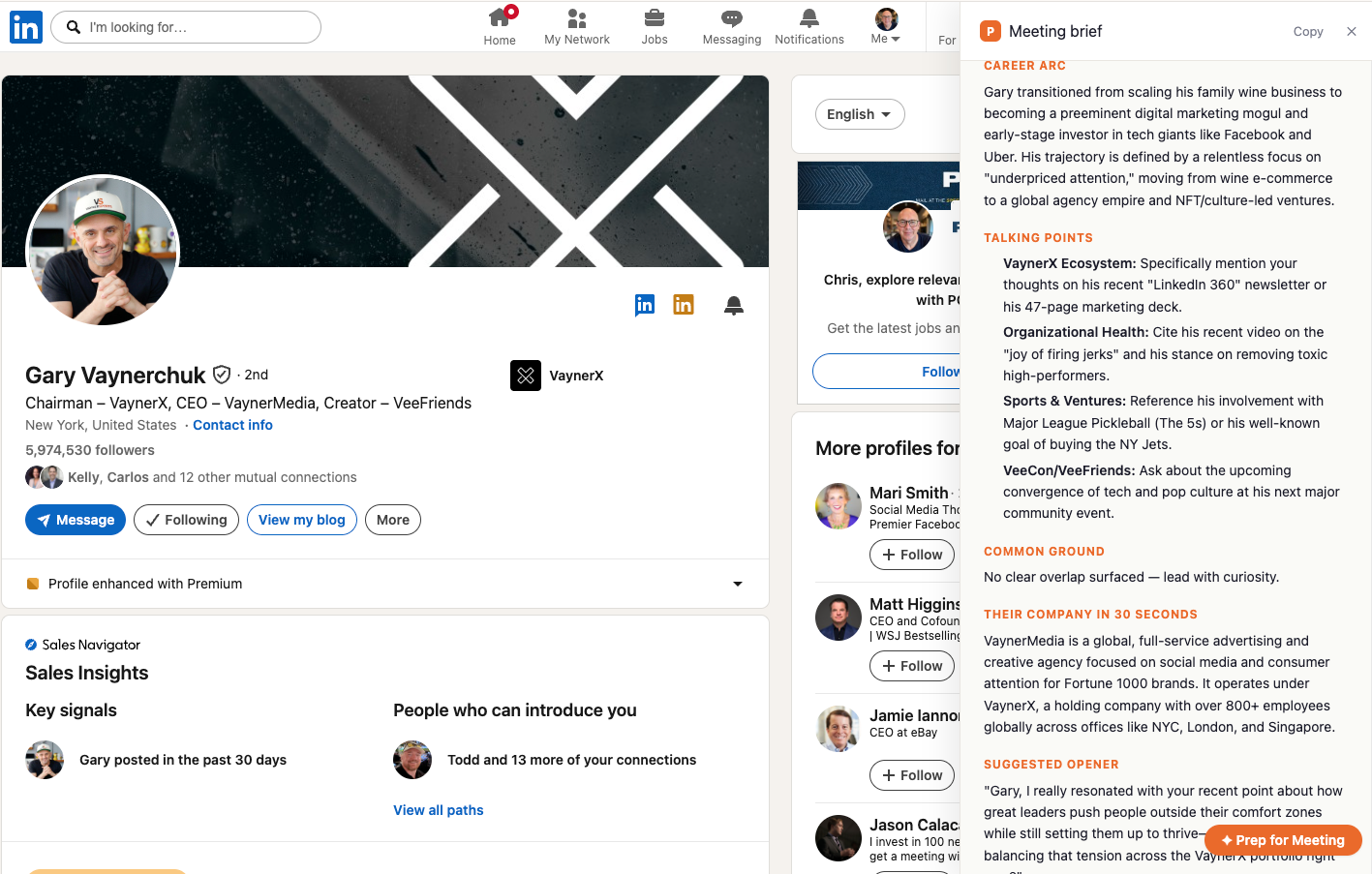
Call Me Ready is a Chrome extension that adds a “Prep for Meeting” button to every LinkedIn profile. Click it and an AI profile summary opens in a side panel next to the profile: snapshot, career arc, talking points, common ground, their company, a suggested opener, and watch-outs. Install once, sign in once, then it is a single click per person.
The four steps
- 1
Install the extension
Add Call Me Ready to Chrome. It runs only on linkedin.com pages you open yourself, and it stays idle until you click.
- 2
Sign in once
Create a free account. The free plan gets 5 free profile summaries per month, refreshed on your signup anniversary date. Buying a credit pack replaces that monthly allowance with credits that never expire.
- 3
Open any LinkedIn profile
A “Prep for Meeting” button appears in the profile action bar, next to Connect and Message.
- 4
Click and read
A side panel opens with your profile summary. Reopening the same profile within 30 days shows the stored profile summary again and costs nothing.
What a profile summary contains
Every profile summary is a one-pager built for the sixty seconds before a call. The same 7 sections appear every time, so you always know where to look.
| Section | What it gives you |
|---|---|
| Snapshot | Name, current role, company, and tenure at a glance. |
| Career arc | A two-sentence narrative of how they got here. |
| Talking points | Four to five specific, non-generic openers tied to their work. |
| Common ground | Shared companies, schools, cities, and overlapping years. |
| Their company in 30 seconds | What the business does and who it serves. |
| Suggested opener | A drafted first line you can say out loud. |
| Watch-outs | Polite flags — recent role changes, sensitive topics, name pronunciation. |
See it on a real profile
What the extension can and cannot read
| Call Me Ready reads | Call Me Ready never reads |
|---|---|
| Visible text on the single profile page you clicked | Your LinkedIn password or credentials |
| Your account email, for your own profile summary history | Your inbox, DMs, feed, or search history |
| Nothing at all until you press the button | Any page in the background, on a timer, or in bulk |
Full detail is in the Privacy Policy.
Ready before the call.
Install Call Me Ready™, open any LinkedIn profile, and click Prep for Meeting. Your first 5 profile summaries each month are free.