
Every Call. Already ready.
Call Me Ready™ drops a button onto every LinkedIn profile. One click and you get an instant AI overview — talking points, common ground, watch-outs, and more.
5 free profile summaries a month on the free plan · No card required · Works in Chrome, Edge, Brave, Arc and Opera
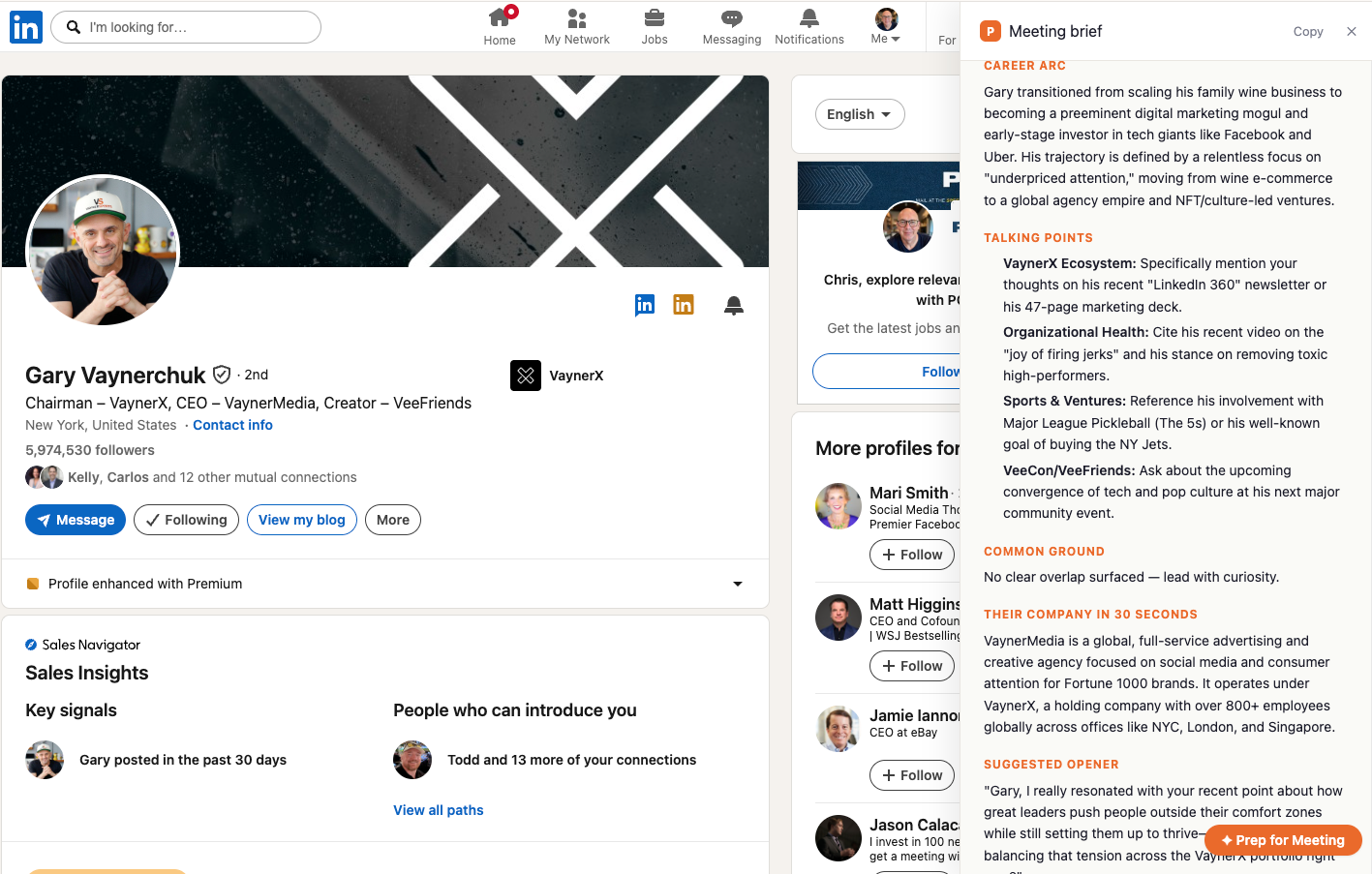
A full profile summary, right next to the profile.
One click on the “Prep for Meeting” button opens a side panel with career arc, talking points, common ground, and a suggested opener — generated in seconds.
Three steps. Zero busywork.
Install in about a minute
Add the extension from the Chrome Web Store and sign in once. That's the whole setup.
One click on any profile
A native-looking “Prep for Meeting” button appears on every LinkedIn profile you open.
Summary appears instantly
Snapshot, career arc, talking points, common ground, opener — all in seconds, in a side panel.
Every profile summary is a one-pager designed for the 60 seconds before a call.
No fluff, no copy-pasting from five tabs. Just the seven sections you actually need, generated from the profile in front of you and personalized to what you might have in common.
- Snapshot — name, role, company, tenure
- Career arc — a 2-sentence narrative
- Talking points — 4–5 specific, non-generic openers
- Common ground — mutual companies, schools, locations
- Their company in 30 seconds
- Suggested opener — drafted in your voice
- Watch-outs — polite flags before you misstep
Great for any conversation where showing up prepared pays off.
If you're about to talk to someone whose LinkedIn you just opened, Call Me Ready™ turns the next 60 seconds into your unfair advantage.
Cold calls & sales meetings
BDRs, SDRs, and AEs: open every dial, discovery call, and demo with talking points tied to their world.
HR & recruiting interviews
Skim their career arc, spot the story behind the résumé, and ask sharper questions.
Networking coffees
Find common ground before you sit down — mutual companies, schools, cities, moments.
Partnerships & BD intros
Understand their business in 30 seconds so the first meeting isn't a warm-up round.
Podcast & press interviews
Get a fast read on your guest's career, ventures, and recent posts before you hit record.
Investor & advisor chats
Walk into the room already knowing their thesis, portfolio patterns, and hot buttons.
Only reads what you ask it to. Nothing more.
Call Me Ready is built to be the opposite of a background scraper. The extension sits idle until you deliberately click the button on a single profile you’re preparing for.
Click-triggered only
The extension reads profile text only after you press “Prep for Meeting” on that specific page. No polling, no auto-scan, no background jobs.
No silent watching
We never read your LinkedIn credentials, cookies, DMs, feed, or search history. The extension activates on linkedin.com pages you open yourself and does nothing until clicked.
Your data stays yours
Profile text is sent to our servers only to generate the profile summary you requested. We don’t sell data, don’t share it with advertisers, and don’t use it to build cross-user profiles.
Full details in our Privacy Policy.
Common questions
- What is Call Me Ready?
- Call Me Ready is a Chrome extension that adds a “Prep for Meeting” button to every LinkedIn profile. One click opens an AI profile summary in a side panel with a snapshot, career arc, talking points, common ground, their company, a suggested opener, and watch-outs.
- How much does Call Me Ready cost?
- The free plan includes 5 profile summaries per month. Extra profile summaries come in one-time credit packs: $19 for 50 or $29 for 100. Purchased credits never expire, and once you buy a pack the monthly free credits stop renewing.
- What data does Call Me Ready read?
- Only the visible text of the single LinkedIn profile page you are viewing, and only after you click the button. It never reads your credentials, inbox, messages, feed, or search history, and it does not scrape in the background or in bulk.
- Who uses it?
- BDRs and SDRs before cold calls, account executives before discovery calls and demos, recruiters and hiring managers before screens and interviews, and anyone heading into a networking, investor, partnership, or podcast conversation.
Stop showing up cold.
Install the extension, open any LinkedIn profile, and turn it into a profile summary. Your first 5 profile summaries each month are free on the free plan.